
An MT5 market scanner that shows its reasoning
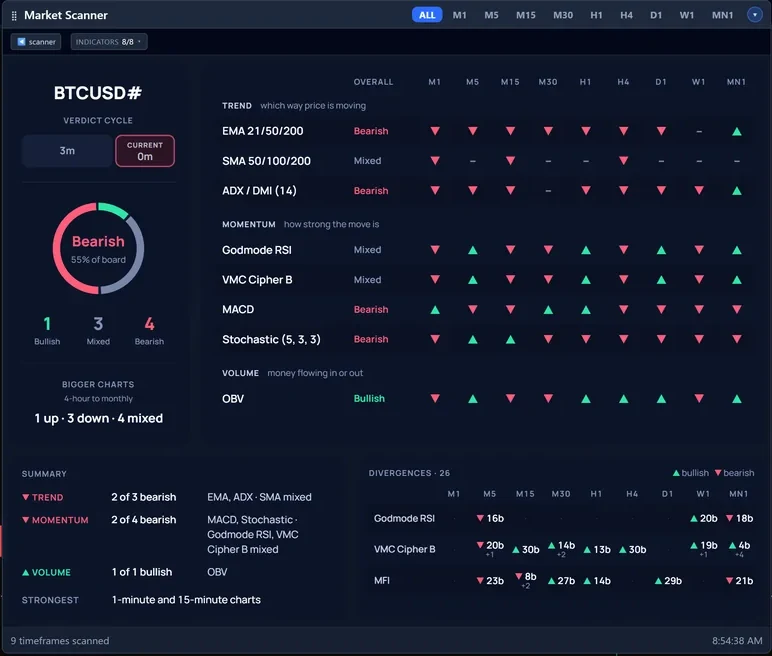
MetaTrader 5 can show you every chart. It can't tell you which ones deserve a look. ACM scans your whole instrument list across nine timeframes and gives each one a bullish, bearish or mixed reading, with the explanation one tap away.
Explore Pro for 30 daysWhat's missing from MT5 on its own
MT5 lets you tile charts and attach indicators, and that part works fine. What it doesn't do is look across your whole list of instruments and timeframes and point at the ones that need attention. So you open each chart yourself, switch timeframes, and check indicators one at a time. ACM adds the scanning layer on top of the MT5 connection you already use.
How the ACM scanner works
1. It finds your terminal
Log in to your broker in MetaTrader 5 as usual. ACM finds the running terminal on its own, on a demo or live account.
2. It matches your symbols
Brokers name instruments differently (GOLD, XAUUSD.a, XAUUSD#). ACM works out the right name at your broker automatically.
3. It scores each instrument
The technical studies you choose, across nine timeframes, are reduced to one reading per instrument: bullish, bearish or mixed.
See why, not just a label
Most scanners show a coloured badge and leave you to trust it. In ACM you can open an instrument, pick a timeframe, and see each study's one-line explanation. Expand any row for the numbers behind it, such as crossovers, bars since a signal, or divergence age. ACM also tracks how long a reading has held and what it was before, and maps price-versus-momentum divergence across all nine timeframes in one grid.
What the scanner covers, by plan
Every plan connects to any instrument your MT5 broker offers and includes all 21 timeframes. The number of symbols the scanner covers at once depends on the plan.
Essential
1 scanner symbol
Essential+
4 scanner symbols
Pro
10 scanner symbols
Pro+
Unlimited scanner symbols
The scanner works on candles, line, line with markers and step line. It switches off on Heikin-Ashi, Renko and Kagi, which are display-only chart types, and it is paused during Bar Replay. See full plan details and prices.
MT5 market scanner questions
Does MetaTrader 5 have a built-in market scanner?
MT5 has a Market Watch list and lets you open charts and attach indicators, but it has no built-in view that scores your whole list of instruments across several timeframes at once. ACM adds that as a desktop app that reads from your running MT5 terminal.
What does the ACM market scanner look at?
It runs the technical studies you choose (from 13 available to the scanner) across nine timeframes for each instrument your plan covers, and reduces them to one reading per instrument: bullish, bearish or mixed. You can open any instrument to see each study's one-line explanation and the numbers behind it.
How many symbols can the scanner cover?
It depends on the plan: 1 symbol on Essential, 4 on Essential+, 10 on Pro and unlimited on Pro+. Every plan works with any instrument your MT5 broker offers.
Does the scanner place trades or give trading signals?
No. ACM never places a trade and never touches your account. It reads market data through MetaTrader 5 and shows what the technical studies currently say. It is a charting and analysis tool, not financial advice.
Does it work with my broker and account type?
ACM works with any MetaTrader 5 broker, on demo or live accounts. It finds the running terminal and matches your broker's symbol names automatically, including suffixes.
Is the scanner available on every chart type?
The scanner and indicators work on candles, line, line with markers and step line. Heikin-Ashi, Renko and Kagi are display-only chart types, so the scanner switches off on those. It is also paused during Bar Replay so live readings never appear beside historical charts.
Scan the market instead of clicking through charts.
Thirty days of full Pro access for $9.99. No recurring charge. The trial expires 30 days after first activation, and you may purchase any ACM plan afterward.
Start the trial